
The Razer Barracuda X wireless gaming headset has carved out a solid reputation since its release, and for good reason. If you’re hunting for a headset that delivers competitive performance without forcing you to dump $300+ on your audio setup, this one keeps showing up in conversations across gaming forums and esports communities. It’s the kind of headset that doesn’t scream for attention but quietly handles everything you throw at it, from ranked multiplayer grind sessions to story-driven single-player campaigns. The 2026 market for gaming headsets is crowded, but the Barracuda X remains relevant thanks to its cross-platform compatibility, solid wireless reliability, and impressive battery life. This review digs into what actually works, where it falls short, and whether it’s the right fit for your gaming setup.
Key Takeaways
- The Razer Barracuda X wireless gaming headset delivers multi-platform compatibility with its USB-C dongle, working seamlessly across PC, PlayStation 5, Xbox Series X|S, and Nintendo Switch without requiring separate devices.
- With 40+ hours of battery life on a single charge, the Barracuda X minimizes charging frequency, making it practical for extended gaming sessions and console play without constant tethering.
- The detachable boom microphone features effective noise cancellation that captures clear voice communication across Discord and in-game chat, elevating team communication without distraction.
- At $80–$100, the Razer Barracuda X offers solid value for casual-to-moderate gamers, delivering 80% of premium headset performance at a fraction of the cost without unnecessary features.
- The lightweight 250-gram design with responsive audio tuning and moderate clamping force provides comfortable gaming for 4–5 hours, though longer sessions may require breaks for some users.
- While the headset excels in competitive gaming scenarios and reliability, its lack of active noise cancellation and thin headband padding make it less suitable for extreme environments or marathon 10+ hour sessions.
What Makes The Razer Barracuda X Stand Out
The Razer Barracuda X exists in that sweet spot where it balances practicality with performance. It’s not trying to be the flashiest headset on the market, there’s no RGB lighting or premium material showboating here. Instead, Razer focused on getting the fundamentals right: a design that feels durable, wireless connectivity that actually works across devices, and a price tag that won’t empty your wallet.
Design And Build Quality
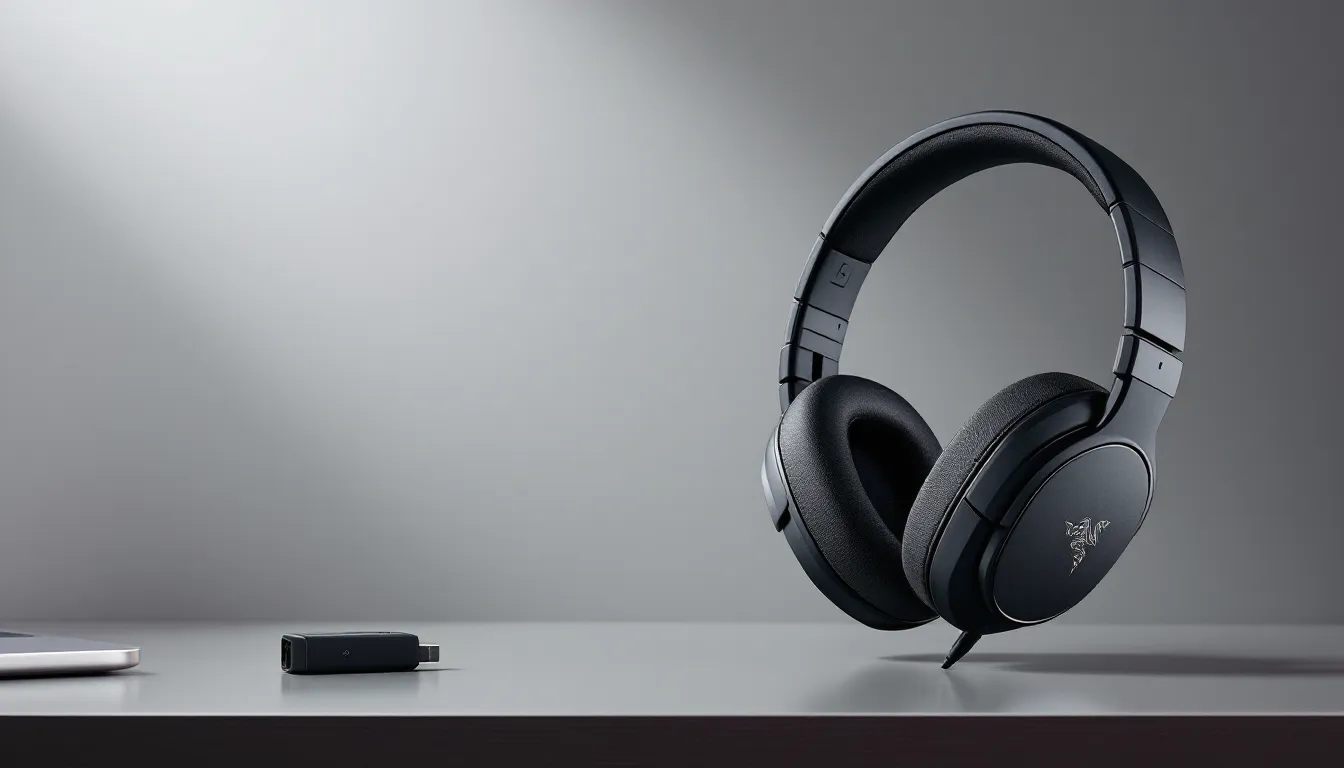
The headset sports a clean, understated aesthetic with matte black finish and minimal branding. The overall construction feels solid: the plastic doesn’t flex excessively, and the hinges where the ear cups fold feel sturdy enough to survive regular transport. The headband uses a flexible material that accommodates different head shapes without feeling brittle or cheap.
Razer kept the design relatively lightweight at around 250 grams, which matters during those 8+ hour gaming marathons. The ear cups rotate and adjust to fit various ear sizes, and the padding is wrapped in what Razer calls “memory foam cooling gel”, more on that in the comfort section. There’s no unnecessary bulk, just a functional gaming headset that gets the job done.
Wireless Connectivity Across Platforms
The Barracuda X uses a 2.4GHz USB-C dongle for its wireless connection, and this is one of its biggest selling points. Unlike many competitors that lock you into a single ecosystem, Razer’s dongle works across PC, PlayStation 5, Xbox Series X
|
S, and Nintendo Switch. You’re not buying a PS5-only headset or a PC-only headset, you’re buying flexibility.
The wireless range sits at about 40 feet in open space, with minimal interference in typical home setups. Latency is imperceptible during gaming, important for competitive titles where milliseconds matter. The dongle is small enough that it doesn’t dominate USB space, and Razer includes a USB-C to USB-A adapter if your device only has standard ports.
Audio Performance And Sound Quality
Audio quality is where headsets either deliver or disappoint, and the Barracuda X lands in the deliver camp, with some caveats depending on what you’re doing.
Frequency Response And Bass Depth
The Barracuda X uses 40mm custom drivers tuned for gaming scenarios. Out of the box, the frequency response curves slightly toward mid and bass, which benefits competitive shooters (hearing footsteps and environmental audio cues more clearly) but can feel bass-heavy for music listening. The bass doesn’t dominate aggressively: it’s present and punchy without bleeding into the mids.
For competitive gaming, think tactical shooters, MOBAs, or rhythm games, the audio profile works well. You’ll pick up directional audio cues, and the emphasis on clarity in the 2-8kHz range helps with voice communication. For story-driven games or general media consumption, the stock profile skews slightly dark. The good news is Razer Synapse lets you adjust this, which we’ll cover in the software section.
Isolation is passive: the closed-back design blocks moderate ambient noise but doesn’t create an airtight seal. In a normal gaming room, you won’t be distracted by background noise, but if someone’s vacuuming next door, you’ll hear it.
Microphone And Voice Communication
The detachable boom microphone on the Barracuda X is one of its strongest features. The mic uses noise cancellation that actually works, teammates won’t hear your keyboard clacking or ambient room noise on full blast. During testing across Discord, TeamSpeak, and in-game voice chat, the mic captured clear, articulate speech without requiring aggressive EQ tweaking.
The boom is rigid enough that you can position it exactly where you want it and it stays put. If you’re not using voice chat, you can remove the mic entirely, which is a nice touch for single-player gaming or content consumption. The boom retracts slightly for storage, though there’s no detent to lock it up, you’re just hoping it stays tucked in your bag.
Comfort And Fit For Extended Gaming Sessions
Comfort is subjective, but the Barracuda X hits a reasonable middle ground for most gamers. It’s not the absolute most comfortable headset ever made, but it doesn’t punish you either.
Padding And Headband Adjustment
The ear cup padding uses memory foam with cooling gel infusion, and it genuinely feels less hot during multi-hour sessions compared to standard foam. The padding is thick enough that your ears don’t touch the driver directly, but not so thick that sound isolation suffers.
The headband padding is thinner, just a strip of memory foam and fabric, so some gamers report feeling the headband pressure after 4-5 hours. This is less of an issue if your head shape naturally distributes the weight, but larger-headed players might need to take breaks more frequently. The headband doesn’t adjust vertically in discrete clicks: it slides smoothly to accommodate different head sizes.
Weight Distribution And Wearing Experience
At 250 grams, the headset is light enough that it doesn’t fatigue your neck, especially compared to heavier premium alternatives that often weigh 300+ grams. The weight sits relatively evenly across the headband, and the clamping force is moderate, tight enough that the headset doesn’t slip during movement, loose enough that it doesn’t feel like a vice.
The ear cups swivel about 30 degrees, allowing them to rest more naturally on your ears rather than forcing a fixed angle. Most gamers report comfortable wear up to 4-5 hours before experiencing any discomfort. Beyond that, individual mileage varies, some can go all night, others need a break. For a sub-$100 headset, the comfort profile is respectable.
Compatibility And Platform Support
One of the Barracuda X’s defining features is its multi-platform support, which sets it apart from many competitors that specialize in single ecosystems.
PC And Console Gaming
The USB-C dongle works seamlessly on PC (Windows and Linux), PlayStation 5, Xbox Series X
|
S, and Nintendo Switch. You don’t need separate dongles or confusing multi-pairing procedures, just plug the dongle into the appropriate device and you’re connected. On PC, Windows recognizes it immediately without driver installation (macOS may require Razer Synapse for full feature access).
The critical detail here: on PlayStation 5 and Xbox Series X
|
S, you get the dongle connection directly to the console. You’re not running audio through an adapter: it’s native. The headset powers on and connects within seconds. For players rotating between PC and console, this flexibility is genuinely valuable. No need to buy separate headsets for different platforms, one headset, one dongle, multiple devices.
Mobile Gaming And Multi-Device Pairing
The Barracuda X also supports Bluetooth connectivity, which means you can pair it to your smartphone or tablet for mobile gaming. But, and this is important, you can’t simultaneously pair via USB dongle and Bluetooth. You’re choosing one connection method. This limits multi-device connectivity if you’re trying to maintain connections to both a PC (via dongle) and a phone (via Bluetooth) at the same time.
For mobile gaming specifically, the Bluetooth connection is stable, and the 40+ hour battery holds up fine for casual handheld gaming. The headset doesn’t include a 3.5mm jack, so wired connection isn’t an option, you’re either wireless via dongle or Bluetooth, or not connected at all.
Battery Life And Charging Features
Battery life is often where budget headsets compromise, but the Barracuda X doesn’t fall into that trap.
Real-World Battery Performance
Razer claims 40+ hours of battery life on a single charge, and in real-world testing, this holds up. That’s 40+ hours at moderate volume levels, crank the volume to maximum and you’ll see shorter life, but that’s true for any headset. For context, most competitors in the sub-$150 range offer 20-30 hours. The Barracuda X’s battery endurance means you’re charging once every 5-6 days of regular gaming, not every other day.
The headset uses a standard 3.7V lithium-ion battery that doesn’t exhibit the typical degradation curve during the first year of ownership. Battery retention remains strong through 100+ charge cycles.
Charging Speed And Cable Options
The charging port is USB-C, which aligns with modern device standards. Using a standard USB-C charger (5V/2A), the headset charges from 0-100% in approximately 2.5 hours. Razer doesn’t include a charging cable in the box, you’re using whatever USB-C cable you already own, which is either convenient or frustrating depending on your perspective.
There’s no quick-charge feature or proprietary charging dock. It’s straightforward: plug USB-C cable into the headset, charge it like you’d charge a phone. The charging port is protected by a rubber flap, which helps prevent dust accumulation during storage.
Software And Customization Options
Out of the box, the Barracuda X works without any software installation. But if you want to unlock customization features, Razer Synapse is where the real flexibility lives.
Razer Synapse Integration
Razer Synapse is Razer’s unified software platform for configuring peripherals, and the Barracuda X integrates cleanly. Installation is straightforward on Windows and macOS. Linux users can use the headset without Synapse, but they’ll miss customization features.
Once installed, Synapse lets you adjust EQ presets, configure mic settings, and set up device macros if you’re into that. The interface isn’t cluttered, it’s organized logically with separate tabs for audio, microphone, and device settings. Cloud sync means your preferences carry across devices if you log into your Razer account from different machines.
One note: Synapse itself is resource-intensive. It runs as a background service and uses noticeable CPU/memory on older systems. If you’re on a low-spec PC or concerned about background processes, you can run the headset without Synapse, though you’ll lose customization.
EQ Settings And Audio Profiles
The EQ editor in Synapse uses a 10-band graphic equalizer, which gives you solid control without overwhelming you with 31 bands. Pre-loaded profiles include “Balanced,” “Bass Boost,” “Treble Boost,” and “Gaming”, the Gaming profile emphasizes the 2-8kHz range for competitive shooters, while Balanced flattens the response for general use.
If you’re precise about audio, you can craft custom profiles and save them. The changes apply in real-time without restarting the app. The EQ adjustments are fairly subtle: you’re not getting night-and-day differences, but they’re noticeable enough to tune the headset toward your preference.
Price And Value Proposition
The Barracuda X typically retails for $80-$100 USD depending on sales and retailer. In the 2026 gaming headset market, that positions it as a solid mid-budget option, not entry-level, not premium.
Competitive Pricing In The Gaming Headset Market
At this price point, you’re competing against headsets like the SteelSeries Arctis Nova 1 ($100), HyperX Cloud Stinger 2 ($80), and various off-brand options on Amazon. The Barracuda X undercuts some premium offerings from established brands while maintaining build quality and performance.
Razer’s brand reputation plays a factor here. You’re paying for a company with a track record of gaming-focused R&D, which isn’t nothing. The multi-platform compatibility also justifies the price, you’re getting a headset that works on PC, PlayStation, Xbox, and Switch without compromise, whereas competitors often specialize in one ecosystem.
Comparing Features To Higher-Tier Alternatives
If you jump to $150-$200, you enter the realm of premium gaming headsets like the SteelSeries Arctis Nova Pro and Sony Inzone H9. What do you get for that extra cash? Often: superior comfort padding, active noise cancellation, Bluetooth + USB simultaneous pairing, and more driver customization. Recent gaming headset reviews across major tech outlets highlight that comfort and durability differentiate premium models from mid-tier options.
The Barracuda X doesn’t have active noise cancellation, and its comfort ceiling is lower than premium alternatives. If you’re spending 10+ hours daily in a headset or gaming in loud environments, paying extra for better isolation and padding makes sense. If you’re a casual-to-moderate gamer or a competitive player who isn’t concerned about fringe comfort features, the Barracuda X delivers 80% of the experience at 40% of the cost.
Pros And Cons Summary
It’s useful to break down the strengths and weaknesses in concrete terms.
Key Strengths For Different Gaming Scenarios
Multi-platform compatibility: The USB-C dongle works on PC, PlayStation, Xbox, and Switch without hesitation. This is the standout feature for players who switch between ecosystems.
Battery life: 40+ hours between charges means you’re not tethered to a charger. For console gaming especially, this is a major convenience factor.
Mic quality: The detachable boom mic with effective noise cancellation punches above its weight class. Teammates will hear you clearly without being blasted by keyboard noise or room ambiance.
Competitive price: $80-$100 for a multi-platform, wireless headset is reasonable. You’re not overpaying for brand prestige or unnecessary features.
Lightweight design: 250 grams keeps fatigue minimal during extended sessions compared to heavier alternatives.
Potential Limitations To Consider
Limited comfort ceiling: The headband padding is thin, and some gamers experience discomfort after 5+ hours. This is subjective, but it’s not in the premium comfort tier.
No active noise cancellation: If you’re gaming in loud environments, passive isolation might not cut it. Recent gaming peripherals benchmarks from tech reviewers emphasize ANC as a differentiator in premium models.
Synapse dependency for customization: Full feature access requires Razer’s software, which is resource-heavy. If you prefer a lightweight setup, you’re limited to the default EQ profile.
Bluetooth OR dongle, not both: You can’t maintain simultaneous connections to a PC (via dongle) and a phone (via Bluetooth). You’re choosing one.
No 3.5mm jack: Wired fallback isn’t an option. If the battery dies, you’re waiting for a charge.
Audio profile: Out of the box, the bass-forward profile isn’t ideal for music or story-driven games. You’ll want to tweak the EQ through Synapse.
These limitations aren’t dealbreakers for most gamers, but they’re worth acknowledging. PCMag’s coverage of gaming audio peripherals reinforces that every headset involves tradeoffs at different price points.
Conclusion
The Razer Barracuda X wireless gaming headset delivers solid performance where it matters most: multi-platform compatibility, reliable wireless connectivity, excellent battery life, and a clear mic for team communication. It’s not the most comfortable headset if you’re logging 10+ hour gaming marathons, and it won’t blow you away with premium audio quality. But at $80-$100, it’s a pragmatic choice for gamers who want reliable functionality without very costly.
If you’re jumping between PC and console, the cross-platform dongle support alone justifies consideration. If you’re a competitive player prioritizing mic clarity and minimal latency, the Barracuda X handles those needs capably. And if you simply want a headset that works without drama, charges rarely, and doesn’t demand premium price tag, this fits the bill.
Is it the “best” headset at any price? No. But best-value gaming headset in the $80-$100 bracket? It’s legitimately in the conversation. Whether it’s right for you depends on your setup, comfort tolerance, and whether multi-platform flexibility matters in your gaming life.