
A solid gaming desk isn’t just furniture, it’s the foundation of your entire gaming experience. Whether you’re grinding ranked matches, streaming to thousands of viewers, or just trying to survive a Friday night horror session, your desk setup directly impacts your performance, comfort, and how long you can actually stay in the game without your back screaming at you. The difference between a random table and a proper target gaming desk comes down to specifics: cable management that doesn’t look like spaghetti exploded, enough surface real estate for your monitors without cramping, and materials that won’t wobble when you slam your keyboard during a clutch moment. This guide breaks down everything you need to know to find the right gaming desk for your playstyle, budget, and space constraints.
Key Takeaways
- A target gaming desk differs from standard furniture by offering larger surfaces (5–8+ feet), built-in cable management, and reinforced edges designed to handle the rigors of competitive gaming.
- Proper ergonomics—including adjustable height, 90-degree elbow positioning, and adequate mousepad space—directly impact your gaming performance, aim precision, and reaction times during extended sessions.
- Mid-range gaming desks ($400–800) offer the best value for most gamers, providing quality materials, cable management systems, and durability without the premium pricing of high-end models.
- Essential features for any gaming desk include sufficient surface area for multiple monitors (at least 72 inches for dual setups), stable cross-braced frames, and smooth laminate surfaces that support consistent mouse tracking.
- Regular maintenance—weekly wiping, monthly deep cleaning, and quarterly structural checks—keeps your gaming desk investment functional and stable for 5+ years of daily use.
- Optimize your setup with monitor arms, proper lighting to reduce eye strain, and strategic peripheral organization to maximize both performance and comfort during long gaming sessions.
What Makes a Gaming Desk Different From a Regular Desk
Key Features That Separate Gaming From Standard Furniture
A regular desk was designed to hold a keyboard, monitor, and maybe some paperwork. A gaming desk was designed to hold your life. The difference isn’t cosmetic, it’s functional. Gaming desks prioritize multiple monitor setups, cable routing systems, and enough surface area to accommodate your keyboard, mouse, headset, controller, and that energy drink you’re probably spilling right now.
Standard desks typically max out at 4–5 feet wide and have minimal cable management. A proper gaming desk target hits 5–8 feet (or more for L-shaped variants), includes built-in cable clips, routing holes, and cable trays. You’ll also see gaming desks with reinforced edges, because unlike your desk at work, your gaming setup takes actual impact, mechanical keyboards being slammed, mice being thrown (okay, maybe not thrown, but definitely aggressive), and constant vibration from your monitor.
Surface texture matters too. Gaming desks usually feature smooth, low-friction tops that let your mouse pad glide without catching. Standard desks often have rougher finishes that’ll destroy your mouse sensor’s tracking speed. That half-millimeter of speed difference? It kills your flick shots and tracking in competitive games. On a gaming desk target, you’re getting materials engineered specifically for precision gaming input.
Ergonomics and Performance Considerations
Ergonomics isn’t just about comfort, it’s about staying competitive. When your wrists are at the right angle, your arms aren’t fatiguing, and your back’s supported properly, your reaction times stay sharp. Slouching over a regular desk after three hours drops your performance noticeably. Your aim suffers, your decision-making slows, and you start making mistakes you’d normally catch.
Gaming desks address this through adjustable heights, allowing you to dial in the perfect position for your arm length and sitting posture. The standard rule: elbows at 90 degrees when your hands are on the keyboard. Too high, and you’re reaching: too low, and you’re hunching. A gaming desk target gives you that flexibility.
They also tend to have larger work surfaces that let you position your mouse further away from your body, reducing shoulder strain and improving your mouse control sensitivity. Pro players know this, your mouse shouldn’t be cramped against your keyboard. You need space to make those big flick shots without running out of mousepad real estate.
Essential Features Every Gaming Desk Should Have
Surface Size and Cable Management
Size directly impacts your setup’s functionality. A 60-inch desk works for a single-monitor, cozy setup. For dual monitors? You’re borderline. For triple monitors or an ultrawide plus a secondary? You need at least 72 inches, preferably 84 inches or more if you want breathing room for your keyboard and mouse.
Cable management separates amateur setups from pro ones. Look for desks with:
- Built-in cable clips along the underside or back edge
- Routing holes pre-drilled so cables pass cleanly underneath
- Cable trays (usually mounted to the underside) that organize and hide cables
- Cable sleeves for bundling multiple cables without the rat’s nest aesthetic
When cables are managed, your setup looks cleaner, you can actually reach behind your desk without getting tangled, and troubleshooting becomes infinitely easier. Plus, good cable management means better airflow around your gear, which helps with temps during long sessions.
Height Adjustment and Stability
Height adjustment is non-negotiable for longer gaming sessions. Your desk needs to be at the exact height where your elbows are at 90 degrees when sitting normally. Even an inch too high or low starts causing wrist and shoulder strain after 2–3 hours.
Manual height adjustment (via crank or lever) is fine if you’re not moving it much, but electric adjustment is the gold standard. You set two or three presets (sitting, standing, monitor placement height), and you can adjust with a button. No fussing with crank handles between play sessions.
Stability is equally critical. Your desk needs to be rock-solid when you’re slamming keys, moving your mouse hard, or even just resting weight on it. Look for desks with cross-bracing underneath and heavy-duty legs. A wobbly desk ruins mousepad consistency and makes aiming feel mushy.
Material Quality and Durability
Gaming desks take abuse. You’re moving mice with precision, keyboards getting hammered, and constant temperature swings if your room gets warm during long sessions. Material matters.
MDF and particle board are budget options but wear quickly. After a year or two of daily gaming, edges start lifting, surfaces ding easily, and the whole thing feels cheap.
Solid wood is durable, looks professional, but costs more and requires maintenance (occasional oiling, avoiding spills that cause staining).
Laminate surfaces (especially commercial-grade) are the sweet spot for gaming. They resist damage, handle spills reasonably well, and stay smooth for mouse tracking. Quality laminates also resist denting from drops or impacts.
The underside matters too, reinforced steel frames with cross-bracing hold everything together when you’re placing weight on the desk or mounting heavy monitor arms. Cheap desks warp over time: good gaming desks stay flat and stable for 5+ years of daily use.
Types of Gaming Desks for Different Gaming Styles
L-Shaped Desks for Multi-Monitor Setups
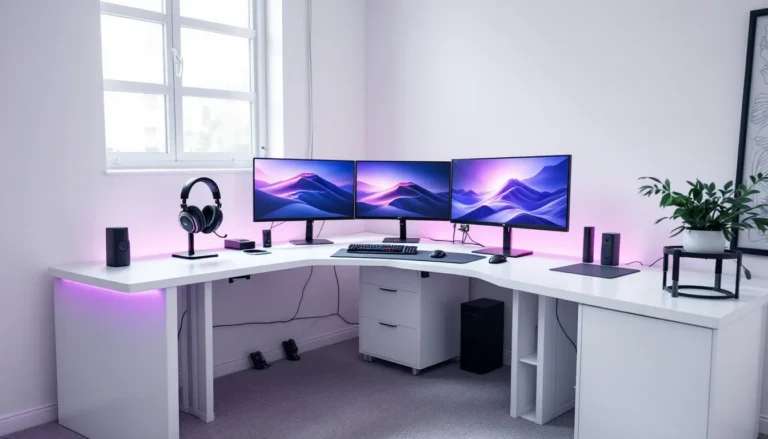
L-shaped gaming desks are the go-to for anyone running multiple monitors. Competitive FPS players often use this layout, main monitor straight ahead for the primary game, secondary monitor to the side for Discord, chat, stream view, or map information. Some players rock triple setups with the main monitor in the center flanked by two secondary monitors.
L-shaped desks give you that corner real estate without taking up excessive floor space. A 60×60-inch L-shaped desk (60 inches on each leg) provides roughly the same footprint as a small living room corner but gives you 7,200 square inches of surface area. You can position your main monitor on one leg and secondary monitors on the corner or the other leg, with plenty of space for your keyboard, mouse, and peripherals.
They do require more room than straight desks, though. Make sure you have the floor space before committing. Also, cable management becomes more complex with L-shaped desks because you’ve got cables running the full perimeter. Choose models with cable routing built into the corner junction for cleaner results.
Compact Desks for Limited Spaces
Not everyone has a dedicated gaming room. Dorms, small apartments, and shared spaces demand compact gaming desks.
Small straight desks (48–55 inches) work for:
- Single-monitor setups with modest peripheral collections
- Laptop gaming with an external monitor
- Console gaming where you’re sitting further back from the desk
Wall-mounted desks save floor space entirely. They fold up, swing down, or stay fixed but take up minimal depth. Downside: you’re limited on surface area and can’t do monitor arms that clamp to the desktop.
Compact gaming corners (often triangular or curved) fit into actual corners and provide angled surfaces that work surprisingly well for single-monitor setups.
The trade-off with compact desks is less surface area for cable management and peripherals, so you’ll need to be intentional about what you place where. Vertical space (shelving above or beside your desk) becomes your friend.
Standing and Adjustable Desks for Long Gaming Sessions
Standing desks are gaining traction in gaming circles, and for good reason. Sitting for 8+ hours straight is brutal on your posture, circulation, and energy levels. Alternating between sitting and standing (typically 50/50 over a day) keeps you fresher and reduces long-term joint strain.
Electric adjustable desks let you swap heights with a button press. Most gamers set two presets: one for sitting (typically 28–30 inches high) and one for standing (typically 42–45 inches high). You stand during loading screens, cutscenes, or matches where you’re ADS-heavy and don’t need mouse mobility.
Gas-lift desks use pneumatic cylinders for adjustment, smoother than manual cranks, less costly than electric. You adjust height by releasing a lever and moving the surface up or down, then locking it.
Fixed-height standing desks are cheaper but less flexible. They work if you’ve already got a sitting setup elsewhere or if you’re exclusively standing while gaming.
Standing desks do require more stability since you’re putting weight on them differently than when seated. Heavier bases and cross-bracing are essential. Also, you’ll probably need an anti-fatigue mat for your feet if you’re standing for more than 30 minutes at a stretch.
Pro tip: If you go adjustable, make sure the motor is silent. A loud hum during quiet games gets annoying fast.
Gaming Desk Setup Optimization Tips
Monitor Placement and Viewing Distance
Monitor height and distance affect both comfort and performance. Your primary monitor should be at eye level when you’re sitting normally, top of the screen at or slightly above your eye line. This keeps your neck neutral instead of tilted up or down. At 27 inches from your eyes (roughly arm’s length), that’s about right for a 27–32-inch monitor. For ultrawides, you might sit slightly further back, around 28–32 inches.
Secondary monitors should sit to the side at a 90-degree angle from your primary monitor, or angled slightly inward (around 30 degrees) so you can see them without straining your neck. Avoid stacking monitors vertically: it forces your neck into uncomfortable positions and kills peripheral awareness.
Monitor arms are worth the investment. They free up desk space, let you adjust height and angle precisely, and move monitors out of the way when needed. Desk-mounted arms with gas springs or electric adjustment give you full control. Make sure your desk’s thickness and material can handle the clamping force, some cheap desks just aren’t built for it.
Keyboard, Mouse, and Peripheral Organization
Your keyboard and mouse should sit on a consistent, smooth surface. Mechanical keyboards (which most gamers use) perform best on a mousepad or padded keyboard tray. The slight elevation also helps with wrist ergonomics.
Mouse placement matters for competitive games. Your mouse should be at the same height as your keyboard, with enough pad space to make full arm movements. The standard setup: mousepad starts about 6 inches to the right of your keyboard’s center, extending at least 12–15 inches to the right. This gives you full mouse mobility for flick shots and 180-degree turns without running out of space.
Peripheral organization keeps your setup functional:
- Headset stand (on desk or mounted to a boom arm) keeps your headset accessible and organized
- Cable clips keep cables routed cleanly instead of draped across your desk
- Controller stands or holders store controllers vertically to save space
- Desk organizer trays for small items (SIM cards, battery chargers, USB adapters) prevent clutter
- Monitor-mounted shelves for headsets, phones, or secondary items keep the desk surface clear
Many gamers use monitor arms with side shelves or desk risers to create vertical storage without eating horizontal surface area.
Lighting and Ambiance for Extended Play Sessions
Lighting directly impacts your ability to stay focused during long sessions. Bad lighting causes eye strain, which kills your precision and reaction times.
Backlighting (behind your monitor) reduces eye strain by balancing the brightness contrast between your monitor and the wall behind it. A simple RGB LED strip ($20–40) mounted behind your monitor makes a noticeable difference after 2+ hours. Warm white or subtle color (nothing flashing) works best for gameplay, bright or flickering lights are distracting.
Desk lamps should illuminate your keyboard and mouse area without creating glare on your monitor. A small, adjustable desk lamp angled away from the screen works. Some gamers go with overhead ambient lighting plus a focused desk lamp.
Monitor brightness and gamma are just as important. Your monitor brightness should be matched to your room lighting, too bright and you’ll get headaches: too dim and you’ll lean in closer, straining your neck. Most gaming monitors let you adjust this via the on-screen menu.
Blue light reduction becomes relevant during late-night sessions. Gaming monitors often have a “low blue light” mode, or you can use software like f.lux to reduce blue light after sunset. This helps prevent sleep disruption if you’re gaming close to bedtime.
The goal: your monitor and peripherals should be well-lit and clearly visible, but without harsh shadows or glare. Anything that reduces eye strain keeps you sharper for longer.
Budget Considerations and Value for Money
Budget-Friendly Options Without Sacrificing Quality
You don’t need to spend $1000+ to get a functional gaming desk. Budget gaming desks in the $150–300 range can absolutely work if you know what to look for.
Best budget option: A simple straight desk (48–60 inches) with a laminate top and a sturdy steel frame. Look for:
- At least 1.5-inch-thick desktop (thinner feels cheap and flexes)
- Cross-bracing underneath
- Pre-drilled cable routing holes
- Adjustable feet to level on uneven floors
Brand-wise, IKEA’s gaming line offers decent value. Their desks are modular, affordable, and widely reviewed. You can also find solid no-name desks on Amazon with 4+ stars and legitimate photos from users, that’s a good sign that the reviews are honest.
Where budget desks cut corners: Thinner materials, plastic instead of metal hardware, poor cable management, wobbly frames. These aren’t dealbreakers if you’re using one monitor and basic peripherals, but they’ll start showing age faster.
The budget-desk strategy: if you’re not sure what size or layout you want, start with a $200 straight desk. Use it for 3–6 months, figure out what you actually need, then upgrade to something better when you know your preferences.
Mid-Range Desks With Premium Features
Mid-range gaming desks ($400–800) are where value peaks. This is the sweet spot where you get:
- Larger surfaces (60–72 inches) with better materials (quality laminate or wood)
- Built-in cable management systems
- Height-adjustable options (either manual or electric)
- Reinforced frames that stay stable
- Better aesthetic design (not just pure function)
Brands like Secretlab, NZXT, and Autonomous have solid offerings in this range. You’re paying for brand reputation and better QA, plus warranty coverage if something breaks.
Mid-range desks usually last 5+ years of daily gaming without issues. They’re also easier to resell or pass down when you eventually upgrade.
Best value: If you’re torn between models, check the warranty length. Desks with 3+ year warranties suggest the manufacturer is confident in durability.
High-End Gaming Desks: When to Invest
High-end gaming desks ($800–2000+) offer premium materials, electric height adjustment, premium cable management, and sometimes integrated features like built-in charging ports or USB hubs.
Worth it if:
- You game 20+ hours per week and need the durability
- You’ve got a multi-monitor setup ($4000+ in hardware) and want a matching desk foundation
- You stream or content create and your desk appearance matters on camera
- You value silent electric adjustment and premium build quality
- You want a 10+ year lifespan with minimal maintenance
Not worth it if:
- You’re still figuring out your gaming setup
- You game casually (5-10 hours per week)
- You’re renting and might move soon
- You’re on a tight budget and a mid-range desk works fine
High-end desks from brands like Secretlab Titan, ProDesk, and some Autonomous models are engineered extremely well. They handle abuse, stay quiet during adjustment, and look sleek on stream. But the jump from $500 to $1500 isn’t a proportional jump in functionality, it’s more about premium finishes, brand prestige, and warranty.
Realistically: a solid mid-range desk ($500–700) will serve 95% of gamers better than agonizing over premium features you’ll rarely use.
Maintenance and Longevity of Your Gaming Desk
A good gaming desk target is an investment. Proper maintenance keeps it looking sharp and functioning flawlessly for years.
Weekly maintenance:
- Wipe down the surface with a microfiber cloth to remove dust and prevent buildup on your mousepad
- Check cable clips to make sure nothing’s loose or tangled
- Tighten any screws that have loosened from vibration (especially on keyboard mounting brackets)
Monthly maintenance:
- Clean the entire surface with a damp microfiber cloth (not dripping wet, just slightly damp). Avoid harsh cleaners that might damage laminate finishes
- Check monitor arm stability if you’re using one. Tighten any loose joints
- Inspect cable trays and routing for signs of strain or damage
Quarterly maintenance:
- Check the frame’s structural integrity. Look for any flexing, creaking, or instability that wasn’t there before
- If you have an adjustable desk, test the height adjustment mechanism to make sure it’s still smooth and quiet
- Vacuum underneath the desk to prevent dust accumulation that can affect cable cooling
What to avoid:
- Direct sunlight exposure for long periods (causes laminate fading and warping)
- Extreme temperature swings (avoid putting your desk against a window in winter or next to a heater)
- Spilling liquids directly on the surface. If you do spill, wipe immediately with a dry cloth
- Overloading with weight beyond the desk’s rated capacity (most can handle 150–200 lbs of equipment, but don’t push it)
- Rough dragging when moving the desk (lift and carry, especially if you’re moving it solo)
Pro players often mention that their desks are the last thing they upgrade. A quality gaming desk target can outlast multiple monitor upgrades, keyboard swaps, and GPU generations. PC Gamer’s hardware guides often reference desk durability as a key factor in total setup value, and that tracks with what the gaming community sees in practice.
Electric desks need a bit more care. Keep the motor clean (use compressed air to blow dust out of the vents), and if it starts making noise, don’t force it through adjustment, there’s probably something caught. Contact the manufacturer: it’s usually under warranty.
If your desk develops a wobble or creak after a year or two, try tightening all visible bolts and screws first. Often, vibration just loosens hardware over time. If that doesn’t fix it, the frame might be warping, and you’ll need to contact the manufacturer or consider replacing it. Quality desks should be solid for at least 3–5 years with proper care.
Conclusion
Picking the right gaming desk is about matching functionality to your actual setup, not chasing brand names or the highest price tag. A target gaming desk works because it’s engineered for what gamers actually need: cable management that doesn’t look like a disaster, enough surface area for your monitors and peripherals, stability that doesn’t compromise your aim, and ergonomics that keep you comfortable during long sessions.
Start by assessing your real situation. How many monitors? How much space? How much do you game per week? Budget-friendly desks work fine if you’re casual, but if you’re grinding daily, a mid-range desk pays dividends in stability and durability. The pros spending thousands on their setups aren’t doing it for YouTube clout, they’re doing it because consistent, stable equipment directly improves their performance.
Your monitor setup and peripheral placement matter just as much as the desk itself. ProSettings aggregates pro player gear choices and setup preferences, if you’re chasing that competitive edge, see how top players configure their desks and borrow ideas that fit your playstyle. How-To Geek’s gaming setup tutorials also break down the technical details of optimization if you want to dive deeper into specific configurations.
Finally, don’t underestimate maintenance. A $400 desk that’s treated with care and kept stable outlasts a $1500 desk that’s neglected. Pick something that fits your budget and needs, take care of it, and you’ll get years of solid gaming out of it. That’s what a real target gaming desk is about.